QRyptshare v1.1.0 - Custom Styling, Frames & New Formats
Introduction
Following the initial launch of QRyptshare, my goal has always been to provide a privacy-first alternative to the ad-ridden QR generators cluttering the web.
Today, I’m releasing QRyptshare v1.1.0. This update focuses on customization and flexibility, allowing you to create professional-looking QR codes that match your brand or aesthetic—all while keeping the core promise of zero server-side data processing.
🎨 What’s New in v1.1.0?
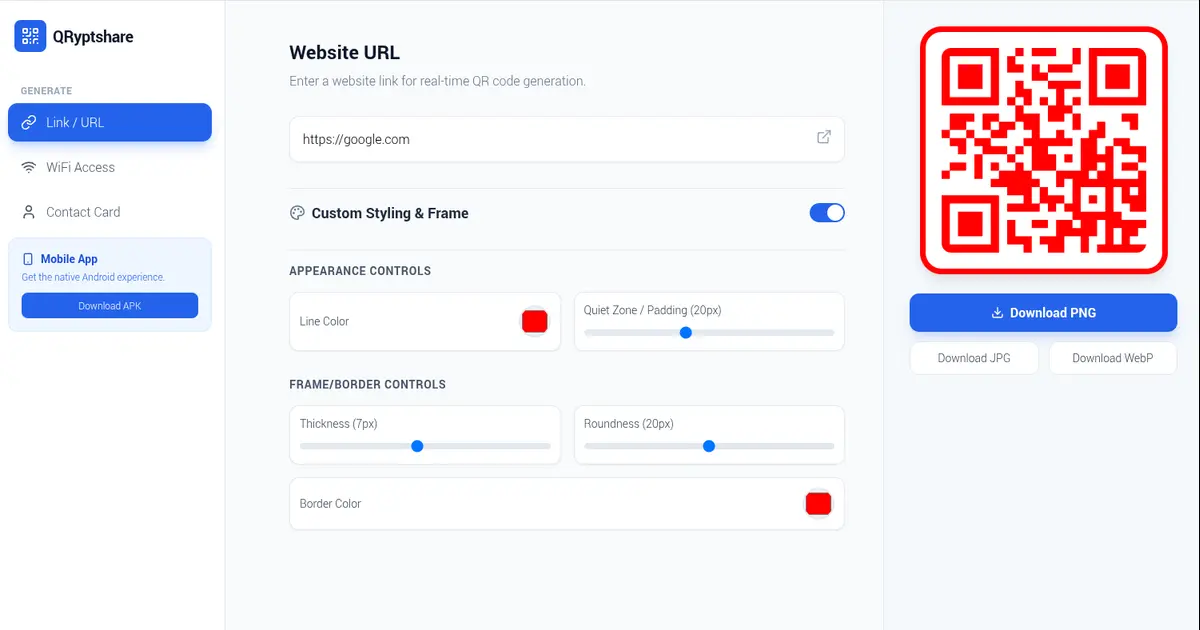
The biggest feedback from v1.0.0 was that while functional, standard black-and-white QR codes can look a bit “raw.” This update introduces a completely client-side styling engine.
1. Custom Styling & Frames
You can now modify the visual appearance of your QR codes directly in the browser:
- Custom Colors: Change the foreground line color (the “data” part) while ensuring the background remains white for maximum scanner compatibility.
- Quiet Zone Control: Adjust the safety margin around the code.
- Border Styling: Add a custom frame, adjust thickness, and round the corners.
2. Expanded Export Formats
The download engine has been rewritten to support multiple formats. Previously locked to PNG, you can now export as:
- PNG (Lossless, transparent capable)
- JPG (Compressed, smaller file size)
- WebP (Modern web standard)
3. Under the Hood: Canvas Manipulation
To achieve these styles without sending data to a server, we utilized the HTML5 Canvas API. The raw SVG generated by react-qr-code is serialized, drawn onto a temporary canvas, and then “framed” using composite operations to draw borders and round corners dynamically before export.
🛠️ Updated Tech Stack & Deployment
The architecture remains lean, utilizing Next.js 14 and Docker on Oracle Cloud Infrastructure (OCI).
Docker Optimization (v1.1.0)
We’ve optimized the Dockerfile to handle build arguments better, ensuring that development dependencies like tailwindcss and autoprefixer are correctly installed during the build phase, even in production environments.
If you are self-hosting, the update process is seamless:
1
2
3
4
cd QRyptshare
git pull
# Force a rebuild to pick up the new styling engine dependencies
docker-compose up -d --build
🔗 Try It Now
The project is live and open source. You can try the web app, download the Android APK, or inspect the code.
| Web App Demo | Project Home | Source Code |
|---|---|---|
| qr.sanchez.ph | qryptshare.sanchez.ph | GitHub |
☕ Support the Project
QRyptshare remains completely free, ad-free, and tracking-free. I pay for the OCI instance and domain costs personally.
If you find this tool useful for your business or personal use, considering buying me a coffee keeps the motivation high!
Full Changelog: View on GitHub